Getting Started with SpatiaLite on Ruby on Rails
Locations are easy, right? All you need are coordinates - longitude and latitude - and you can put things on a map. But once you need distances, intersections, containment checks, or anything more complicated than single points things get interesting quickly.
You could just use PostGIS - after all, it’s what everyone uses. But me, I like SQLite. I like that my database is a single file, I like that I can backup and restore with rsync, and I like the SOLID trifecta - Solid Queue, Solid Cache and Solid Cable. I’m not ditching SQLite, alright?
So, what options do I have? Really, there’s only one: SpatiaLite!
It’s a SQLite extension for spatial data. You could call it PostGIS’s fringe cousin - not exactly mainstream, and definitely not in Rails apps. Which is why you run into all kinds of little issues trying to make it work. Issues that make you feel like you’re the first person ever working with this particular stack of technologies. But that’s all part of what makes programming fun, right?
So, let’s explore some of the nooks and crannies of spatial data handling in SQLite in this two-part series on using SpatiaLite with Ruby on Rails.
What We’re Building
We’ll build a map of Austria where users can add point locations. To make it a bit more interesting, we’ll also show the states of Austria and automatically detect which state a location belongs to. And not only that - we’ll also calculate the center of each state and the distance of each point to that center.
In this first part, we’ll focus on the boring but necessary foundations. We’ll set up a Rails app with a MapLibre-powered map where users can add locations, and we’ll integrate SpatiaLite.
In the second part will focus on the good stuff - showing off the capabilities of SpatiaLite.
Creating Locations
Before we do anything special spatial, we just need a Rails app that lets users pick locations on a map. Let’s set up our base model.
rails new spatialite-demo --main --css tailwind && cd spatialite-demo
bin/rails generate controller Locations index
bin/rails generate model Location name:string 'latitude:decimal{10,6}' 'longitude:decimal{10,6}'
# app/models/location.rb
class Location < ApplicationRecord
  validates :name, presence: true
  validates :latitude, presence: true
  validates :longitude, presence: true
end
Nothing interesting to see here, moving on. The controller and routes are equally simple.
# app/controllers/locations_controller.rb
class LocationsController < ApplicationController
  def index
    @location = Location.new
    @locations = Location.all
  end

  def create
    @location = Location.new(location_params)

    if @location.save
      redirect_to root_path, notice: "Location added!"
    else
      redirect_to root_path, alert: @location.errors.full_messages.to_sentence
    end
  end

  private

  def location_params
    params.expect(location: [:name, :latitude, :longitude])
  end
end
# config/routes.rb
root "locations#index"
resources :locations, only: [:create]
Now, let’s get the UI working.
Adding the Map
We’ll put the map and the form for adding locations on the same page. We’re going for a full-screen map where you double-click to drop a pin, a dialog pops up for the name, and you submit. First, we set up MapLibre via CDN.
<!-- app/views/layouts/application.html.erb -->
<head>
  <link
    href="https://unpkg.com/maplibre-gl@5/dist/maplibre-gl.css"
    rel="stylesheet"
  />
  <script src="https://unpkg.com/maplibre-gl@5/dist/maplibre-gl.js"></script>
</head>
Our application root renders the map and a modal with the location form.
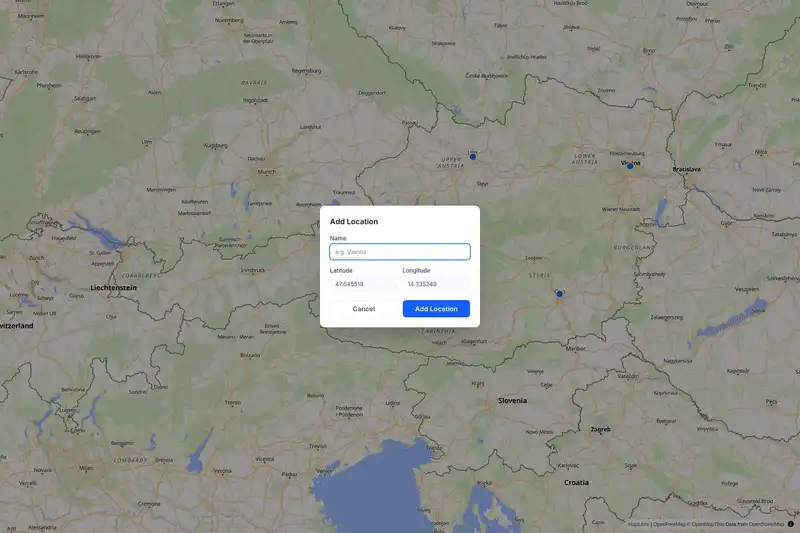
We don’t need a lot of JavaScript, but the little bit we do need is split between two Stimulus controllers. The map_controller initializes the map and dispatches events. Those are handled by location_form_controller, which manages the modal.
<!-- app/views/locations/index.html.erb -->
<div
  class="relative w-full h-screen"
  data-controller="map location-form"
  data-action="map:dblclick->location-form#open"
>
  <div data-map-target="map" class="w-full h-full"></div>

  <dialog data-location-form-target="dialog">
    <%= form_with model: @location do |f| %>
      <h2>Add Location</h2>

      <%= f.label :name %>
      <%= f.text_field :name,
          data: { "location-form-target": "name" },
          placeholder: "e.g. Vienna" %>

      <%= f.label :latitude %>
      <%= f.text_field :latitude,
          data: { "location-form-target": "latitude" },
          readonly: true %>

      <%= f.label :longitude %>
      <%= f.text_field :longitude,
          data: { "location-form-target": "longitude" },
          readonly: true %>

      <button type="button" data-action="location-form#close">Cancel</button>
      <%= f.submit "Add Location" %>
    <% end %>
  </dialog>
</div>
Let’s look at the map controller. On connect, it centers the map on Austria and sets up a couple of click handlers. Double-clicking empty space dispatches a map:dblclick event with the coordinates.
// app/javascript/controllers/map_controller.js
import { Controller } from "@hotwired/stimulus";

export default class extends Controller {
  static targets = ["map"];
  static values = { locations: Object };

  connect() {
    this.map = new maplibregl.Map({
      container: this.mapTarget,
      style: "https://tiles.openfreemap.org/styles/liberty",
      center: [13.33, 47.33],
      zoom: 7,
    });
    this.map.doubleClickZoom.disable();

    this.map.on("dblclick", (e) => {
      const features = this.map.queryRenderedFeatures(e.point, {
        layers: ["locations-circle"],
      });
      if (!features.length) {
        this.dispatch("dblclick", {
          detail: { lat: e.lngLat.lat, lng: e.lngLat.lng },
        });
      }
    });
  }

  disconnect() {
    this.map?.remove();
  }
}
When working with MapLibre (or its ancestor MapBox) there are some concepts worth knowing. You don’t add data directly to the map - you add it to sources. That data generally consists of features. Layers render these features, and you can use queryRenderedFeatures to detect which features exist at a given pixel. Here, we use it to distinguish a click on an existing location marker from a click on empty space. Learning about MapLibre is a bigger topic - if you’re curios check out the MapLibre GL JS documentation.
With location_form_controller, we’re back on familiar territory. This is plain old Stimulus. We subscribe to the event the map controller emits and populate the form using the locations.
// app/javascript/controllers/location_form_controller.js
import { Controller } from "@hotwired/stimulus";

export default class extends Controller {
  static targets = ["dialog", "latitude", "longitude", "name"];

  open({ detail: { lat, lng } }) {
    this.latitudeTarget.value = lat.toFixed(6);
    this.longitudeTarget.value = lng.toFixed(6);
    this.nameTarget.value = "";
    this.dialogTarget.showModal();
  }

  close() {
    this.dialogTarget.close();
    this.latitudeTarget.value = "";
    this.longitudeTarget.value = "";
    this.nameTarget.value = "";
  }
}
We’re using the native <dialog> element here. It’s not the focus of this post, so if you want to take it further - with styled Turbo confirmation dialogs using the newer Invoker Commands API, for example - I recommend Stephen Margheim’s great writeup on Turbo Confirm Dialogs Without JavaScript.
Double-click anywhere on the map, the dialog opens with the lat/lng pre-filled. We can give our location a name and submit.
Listing Saved Locations
Now that we can add locations to the map, we want to list them too. Here’s where another map-related concept enters the stage. We’ll be using the GeoJSON format to represent locations. It describes geometries - points, lines, polygons - as JSON objects and lets you attach arbitrary properties alongside them. MapLibre can render it directly, and we can convert our locations to valid GeoJSON easily enough.
# app/models/location.rb
class Location < ApplicationRecord
  # ... validations ...

  def to_geojson
    {
      type: "Feature",
      geometry: {
        type: "Point",
        coordinates: [longitude.to_f, latitude.to_f]
      },
      properties: {
        name: name,
        latitude: latitude.to_f,
        longitude: longitude.to_f
      }
    }
  end

  def self.to_feature_collection
    {
      type: "FeatureCollection",
      features: all.map(&:to_geojson)
    }
  end
end
The model can now produce map-ready data, but we still need to pass it into the view and teach the map controller how to render it. First, update the controller so the page gets a GeoJSON feature collection.
# app/controllers/locations_controller.rb
class LocationsController < ApplicationController
  def index
    @location = Location.new
    @locations_geojson = Location.to_feature_collection.to_json
  end

  # ...
end
Next, pass that GeoJSON into the map controller from the HTML.
<!-- app/views/locations/index.html.erb -->
<div
  class="relative w-full h-screen"
  data-controller="map location-form"
  data-action="map:dblclick->location-form#open"
  <!-- Add location value -->
  data-map-locations-value="<%= @locations_geojson %>"
>
  <!-- ... -->
</div>
Finally, extend the map controller so it renders locations once the map loads, and shows a popup when you click an existing marker.
// app/javascript/controllers/map_controller.js
import { Controller } from "@hotwired/stimulus";

export default class extends Controller {
  static targets = ["map"];
  static values = { locations: Object };

  connect() {
    this.map = new maplibregl.Map({
      container: this.mapTarget,
      style: "https://tiles.openfreemap.org/styles/liberty",
      center: [13.33, 47.33],
      zoom: 7,
    });

    // Add location layers and Popup
    this.map.on("load", () => this.#addLocations());
    this.map.on("click", (e) => {
      const features = this.map.queryRenderedFeatures(e.point, {
        layers: ["locations-circle"],
      });

      if (features.length) {
        this.#showPopup(features[0]);
      }
    });
    // ...
  }

  #addLocations() {
    this.map.addSource("locations", {
      type: "geojson",
      data: this.locationsValue,
    });

    this.map.addLayer({
      id: "locations-circle",
      type: "circle",
      source: "locations",
      paint: {
        "circle-radius": 8,
        "circle-color": "#2563eb",
        "circle-stroke-width": 2,
        "circle-stroke-color": "#ffffff",
      },
    });
  }

  #showPopup(feature) {
    const { name, latitude, longitude } = feature.properties;

    new maplibregl.Popup()
      .setLngLat(feature.geometry.coordinates)
      .setHTML(`
        <div>
          <strong>${name}</strong><br>
          Latitude: ${latitude}<br>
          Longitude: ${longitude}
        </div>
      `)
      .addTo(this.map);
  }
}
Look,we already have ourselves a useful little app. We can double-click on it, name and save locations, and render them back out as clickable map points. Now, finally, let’s add a little dash of SpatiaLite to the mix.
SpatiaLite for GeoJSON
Enough pretending decimal columns are spatial data. Instead of manually building GeoJSON from loose decimal columns, we’ll use actual spatial data. But first, we need to set up SpatiaLite. It relies on some native libraries, which you’ll have to install.
# Arch
sudo pacman -S libspatialite
# Ubuntu, Debian...
sudo apt update
sudo apt install libsqlite3-mod-spatialite
# Or download from:
# https://www.gaia-gis.it/fossil/libspatialite/index
Rails’ SQLite adapter can load SQLite extensions directly from database.yml, which makes the rest of the setup pleasantly straightforward.
# config/database.yml
development:
  <<: *default
  database: storage/development.sqlite3
  extensions:
    - mod_spatialite
Now let’s change locations to make use of SpatiaLite. SpatiaLite stores geometry in a binary format called Well-Known Binary (WKB). It’s a compact, standardized encoding for points, lines, and polygons that spatial databases and libraries know how to work with.
SpatiaLite stores this in a regular blob column and wraps it with SQL functions that know how to read and write the format. Let’s add a geometry column to our existing locations table:
# db/migrate/20260319000000_add_geometry_to_locations.rb
class AddGeometryToLocations < ActiveRecord::Migration[8.1]
  def change
    add_column :locations, :geometry, :blob
  end
end
A location still accepts latitude and longitude from the form, but after saving we convert those values into a real point geometry using SpatiaLite’s MakePoint function. The SetSRID(..., 4326) part tells SpatiaLite which coordinate reference system to use - SRID 4326 is the standard GPS coordinate system (WGS 84), where coordinates are plain latitude and longitude in degrees. It’s what your phone returns and what most web maps expect.
# app/models/location.rb
class Location < ApplicationRecord
  validates :name, presence: true
  validates :latitude, presence: true
  validates :longitude, presence: true

  after_save :update_geometry

  private

  def update_geometry
    self.class.connection.execute(
      "UPDATE locations SET geometry = SetSRID(MakePoint(#{longitude}, #{latitude}), 4326) WHERE id = #{id}"
    )
  end
end
This gives us the best of both worlds - easy form handling with plain numeric fields and real spatial functions behind the scenes.
In Part Two, we’ll make proper use of the spatial data. For now, we’ll content ourselves with demonstrating that it works by using it to generate GeoJSON that we previously hand-crafted in Ruby. Once the data lives in a geometry column, generating map-ready output becomes a database concern. All we need to do is call the AsGeoJSON function.
# app/models/location.rb
def to_geojson
  geojson_str = self.class.connection.select_value(
    "SELECT AsGeoJSON(geometry) FROM locations WHERE id = #{id}"
  )

  {
    type: "Feature",
    geometry: JSON.parse(geojson_str),
    properties: {
      name: name,
      latitude: format("%.6f", latitude),
      longitude: format("%.6f", longitude)
    }
  }
end
Wrapping Up
So far, we’ve only built the foundation. We have a Rails app that stores locations, a map that can render them, and a geometry column backed by real spatial functions via SpatiaLite. In the next part of this two-part series, we’ll move on to the actual spatial queries. We’ll use polygons for Austrian states, point-in-polygon lookups, and distance calculations to state centroids.